
General Information
Please note that all information provided below:
Is based on years of experience with the interaction of various antivirus software and ad blockers on PC operating systems, course software, the Algorithmics student platform, and online class;
Is of a recommendatory nature and is not a strict requirement; however, technical support cannot be responsible for technical issues that may be caused by the influence of antivirus software and ad blockers on the course software, the Algorithmics student platform, and online class if our recommendations are not followed. We appreciate your understanding 🙏
Just ten years ago, working on a personal computer without an antivirus or with a browser's ad blocker disabled seemed impossible. Today, security threats still exist, and intrusive ads and unnecessary notifications can be distracting.
However, protection tools have significantly improved: most programs, services, and operating systems are already equipped with built-in security mechanisms, and the web pages and services used in our courses are verified and do not abuse advertising. The web applications used in learning (the educational platform and online class) are completely free of advertising notifications, and their operation does not require third-party software for protection.
Using antiviruses and ad blockers during learning can create problems: blocking important platform elements, false positives, and interrupting the learning process. To ensure stable operation and comfortable learning, Algorithmics technical support recommends temporarily disabling antiviruses and ad blockers for the entire duration of the classes. After the classes end, you can reactivate the protection.
This solution has been tested on thousands of students and allows you to focus on the learning process without being distracted by technical failures. At the same time, data security remains at a high level thanks to built-in protection systems.
What is an ad blocker and how to disable it?
An ad blocker is a browser extension that prevents the browser or application from communicating and loading unwanted - advertising elements of web pages: banners, ads, videos, pop-ups, and so on.
To disable the ad blocker:
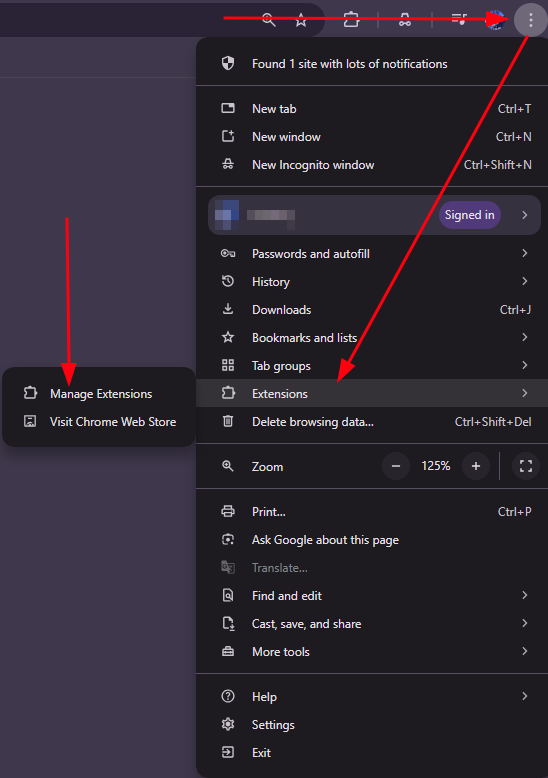
1. Click the three dots in the upper right corner of the browser (photo 1)
2. Go to the extensions tab -> manage extensions -> (photo 1)
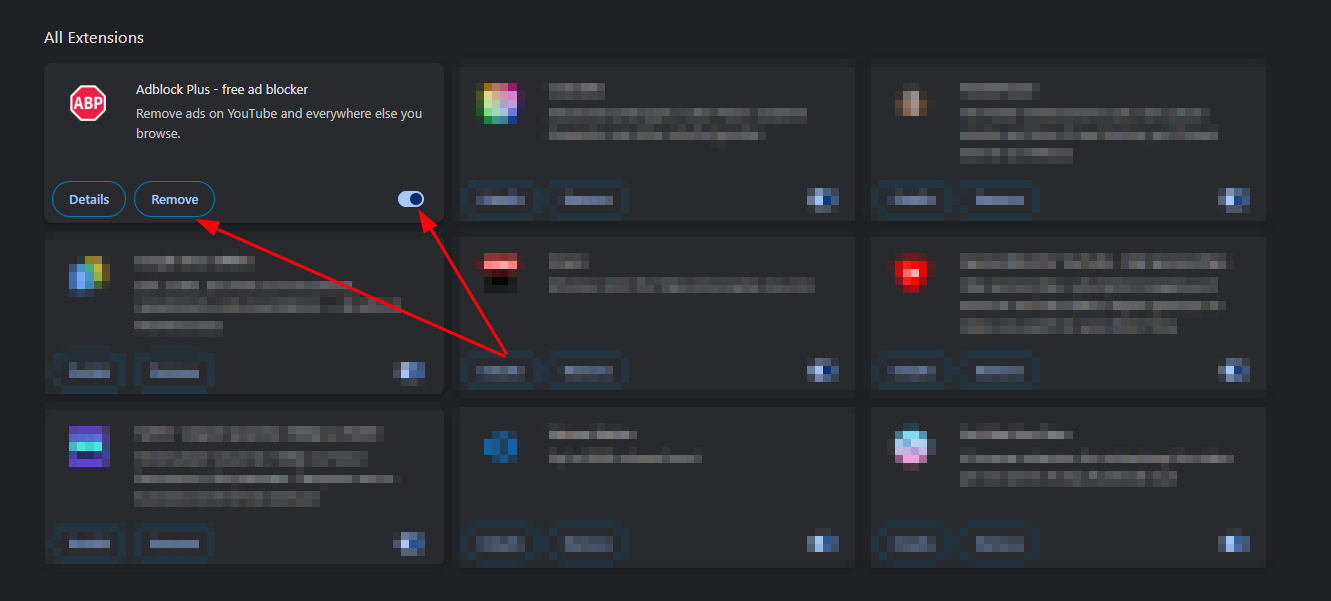
3. In the menu that opens, disable the extension using the toggle switch, or delete it (photo 2)
It is worth noting that some antivirus programs, such as Kaspersky, may install their own extensions in the Google Chrome browser; you can also remove them using the instructions above.
What is an Antivirus and how to disable it?
Antivirus software is a means of protecting equipment from malicious code: viruses, malware, adware, and so on.
An antivirus is loaded onto a PC as a program or a suite of software tools and detects interference from malicious code in the file system from the outside, then blocks the modified files - places them in quarantine and either deletes them or repairs them according to an internet-updated database of profiles for known threats.
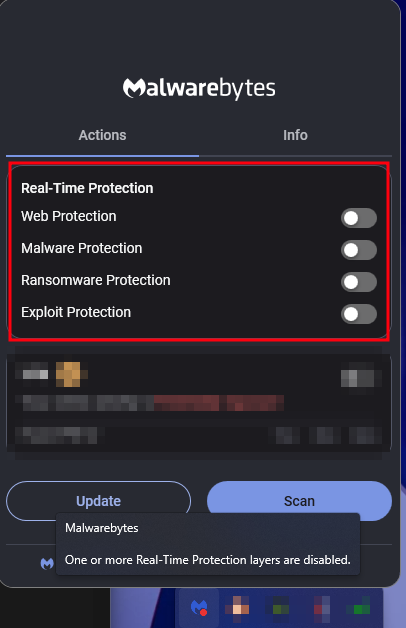
Unfortunately, there is no universal way to disable an antivirus — each program does it differently. You can find instructions for your specific antivirus online, or you can contact us for help by writing to Algorithmics technical support.
As an example, we will show what it looks like in MalwareBytes.
List of antivirus programs not recommended for use
If you have one of the antiviruses listed below installed on your PC, you may encounter serious problems both in the online room and on the educational platform itself. For example: an error may occur when trying to log in or open an assignment, sound, video, or screen sharing may not work. Also, there is a high probability that the antivirus may interact with and interfere with the operation of programs installed on the PC that are necessary for learning.
This is because false positives are not uncommon when antiviruses and ad blockers are running.
List of antivirus software:
Avast Free Antivirus
McAfee® Total Protection
Comodo Internet Security
360 Total Security
Norton AntiVirus
AVG AntiVirus Free
Avira Free Security Suite
Bitdefender Antivirus Free Edition
Panda Free Antivirus
Kaspersky Free/Kaspersky total security
The list is not complete and is updated as more users encounter their incorrect operation: blocking safe content and deleting files on their part.
How can I use the internet without my antivirus?
During the online class, you may only need:
The student platform;
Algorithmics files on Google Drive;
Programs and services tested by our methodology department.
These are reliable resources that do not contain malicious files, and you can use them without an antivirus without risk to your PC.